
Release Notes
Sierra Software 4.1 SP1
(Sierra Summit 4.1.537)
(QuickReport 2.6.51)
(CadLink version 6.3.143)
August, 2025
PN# 369043-810 Rev 14
Please contact the Cadwell Application Support department if you have any questions about the new features available in this update.
Applications Support
(800) 245-3001
6:30 AM to 5:00 PM – Pacific Standard Time Zone
Program Architecture / Window Layout / Miscellaneous
The currently selected system date format is now reflected in the title bar of the Sierra application.
New workflow allows creation of a new patient with an empty study. This allows for entry of all patient information, including examination and custom field information to be saved for later use when the patient arrives for the study.
F1-New Patient -> Enter information -> F2-Save Study & Close.
Use new tab filters to create a tab that only lists these patients. When patient arrives just select the patient and start the study.
Added ability to hide the New Patients tab when using this workflow.
Added support for designating an optional user-defined Word template when starting QuickReport. This feature allows users to imbed macros and other items in a template other than the “Normal.dotm” typically used by Word. Macros can be used to beautify result tables and text, hide unused sections of the report, and perform language translations.
XLSSync is a new optional feature that utilizes the Sierra API and a custom macro-enabled Excel template to extract numerical results and format them in an Excel spreadsheet.
The Excel spreadsheet is saved with the study and automatically uploaded to CadLink.
The Excel spreadsheet can be reviewed from the Documents area.
NCS+
Odd/Even averaging now supported in NCS+ for motor and sensory sites.
After averager is enabled - long press on the base unit’s AVG button to enable/disable odd/even averaging, or click on the icon at the top of the trace window.

Odd/Even trace colors can be defined in the color editor.
Scaling of the audio volume has been implemented, the gain setting no longer needs to be changed to a higher sensitivity in order to hear the live motor activity. This can be reverted to the previous implementation if desired.
The starting stimulus intensity can now be programmed on a Nerve Type (Motor, Sensory, F wave, H-Reflex) basis.
EMG+
MUP baseline is now shown in all MUP windows when duration markers are being adjusted.
New parameter %Dev added for Amplitude and Duration columns in MUP Data Summary table. Also, columns for %Non-poly and %Poly. Column headers can be edited/translated via a new “Text Translations” function in the Edit menu of the Home Page.
Evoked Potentials
Regression reference limit models are now supported for normal values.
User can define an external text file (.csv) containing EP reference limits.
Supported parameters are: Latency, amplitude, inter-amplitude, and side difference for all parameters.
EP Regression reference limits can be edited in the test protocol setups of SEP, VEP, AEP.
Normal and abnormal values highlighted (green/red).
AEP, SEP, VEP protocols now support individual channel rejection.
VEP Checks – new Auto Calibration mode that uses the calibration sensor during data acquisition for improved accuracy in determining the timing of pattern reversal. This mode doesn’t require separate calibration of the monitor delay. The new mode works with both Windows 11 and 10. To use this mode the calibration sensor must remain on the VEP monitor for the duration of the VEP data acquisition, and must be positioned over a sensor target area on either the left or right side of the monitor.
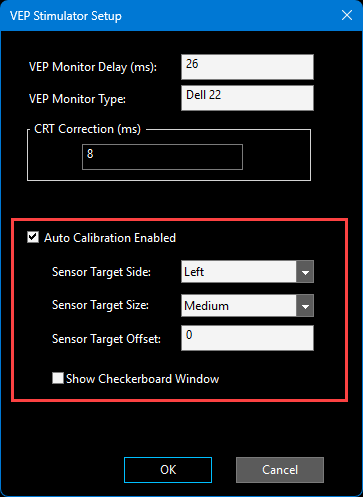
Auto Calibration mode Enabled.
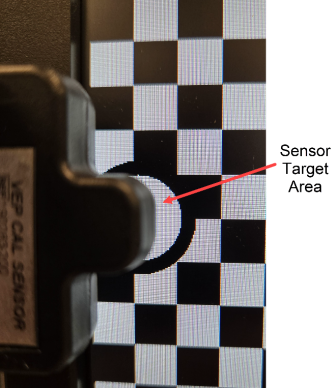
Calibration Sensor positioned over the sensor target on the left side of the monitor.
Note: If the Auto Calibration mode is disabled the VEP test protocol will continue to operate as it did in the previous version of software.
These are reported issues from Summit v4.1.433/4.1.520 LD1 that have been resolved.
EMG+
Comments entered for a stored EMG Live Buffer were not being saved in the Volitional or Auto MUP modes if the ‘Auto Save MUP’ option was enabled.
MUPs are no longer automatically added to the Study window when replaying an EMG buffer in Volitional mode with the trigger enabled.
Fixed an issue where deleting a muscle from the Study window continued to show that muscle name in the Live EMG Trace window.
Fixed an issue where repetitive stimulation would not stop automatically after an overcurrent warning message was displayed.
Fixed an issue in the EMG+ MUP Data Summary table that allowed muscles without MUPs to be listed.
NCS+
Fixed a crash that could occur when selecting a predefined comment for a Site.
Fixed the color associated with a supernormal value.
Fixed the calculation of the Z-score value when using the Mean\SD reference limit with preprocessing functions.
VEP
Fixed an issue that prevented the checkerboard from being displayed correctly when multiple VEP test protocols were used in a Study List.
Fixed an intermittent issue where the checkerboard screen would not respond when starting a study.
Miscellaneous
The Real Time Review feature was not working in version 4.1.520; this has been resolved.
Navigator was not showing a highlight when using the purple knob to select a muscle.
Fixed an issue where the Navigator was preventing the Blink test from being started in some cases.
NMUS+ was crashing on some PCs due to an odd number of pixels in the image window in dual or quad mode.
NMUS+ was crashing in some cases where manual measurements had been deleted.
NMUS+ fixed an issue that prevented the Nerve Calculations table from being edited.
Studies started from an Appointment (HL7 Order) are now uploaded to the Regional Server that the client is connected with. Previously all studies were uploaded to the Regional Server that was processing the HL7 Order messages.
Added a setting to SystemSettings.xml to disable DBSync on Citrix servers so that it will not interfere with multi-session functionality on the server.
On a new Sierra installation, the program will automatically launch as an Administrator once the installation is completed. This is to allow the configuration and registration of all components to be completed.
The Custom Fields in the patient information window now allow scrolling when using F3-Patient Info from the Home Page. Previously these fields were locked and not all entries could be viewed.
Fixed an issue in RNS where the trial sequencing was not correct after resuming a study containing RNS test and adding new RNS tests.
Fixed an issue that prevented the 12-channel amplifier impedance window from being closed using the base unit’s F3 key.
Fixed an issue in the EMG+NMUS test protocol so that the cine buffer and toolbar area are always shown in dark color theme.
Fixed an issue with newly added custom fields in the patient information window so that now they can be cleared on an individual basis when starting a new study from an existing study.
Fixed an issue where custom fields could get cleared when starting a study from an Appointment.
Fixed an issue in legacy NCV test setup where changes to the General Settings were not saved in some cases.
Known Issues
None